High Availability is an architecture design principle focused on minimizing downtime by eliminating single points of failure through redundancy, failover, and automation across all infrastructure layers.
High Availability Architecture
- High Availability Architecture – System design that ensures continuous operation using redundancy, failover mechanisms, and health checks across multiple layers (network, compute, storage, application).
High Availability by Layer
High Availability Cluster/Platform
- HA Cluster – Group of nodes working together to provide redundancy and automatic failover when one node fails.
- Cluster Quorum – Mechanism to prevent split-brain scenarios.
- Heartbeat / Health Checks – Detect node or service failures.
- Failover Automation – Automatically move workloads to healthy nodes.
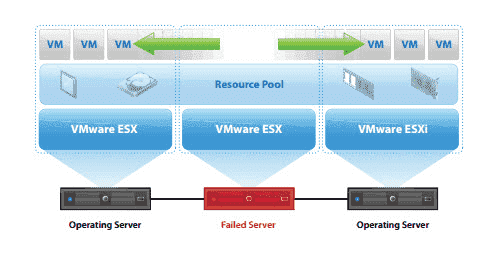
Example 1: Active/Passive HA Cluster (Traditional / Stateful)
Architecture
- Node A (Active) – Runs the application and handles traffic.
- Node B (Passive) – Standby node, no traffic.
- Shared Storage – SAN / NAS for persistent data.
- Virtual IP (VIP) – Moves between nodes.
- Cluster Manager – Pacemaker + Corosync.
How It Works
- Node A serves requests.
- Heartbeat monitors node health.
- Node A fails.
- Cluster manager triggers failover.
- VIP and storage mount move to Node B.
- Application starts on Node B.
Key HA Concepts
- Redundancy – Multiple components for the same function.
- Failover – Automatic switch on failure.
- Fault Tolerance – Continue operation despite failures.
- Quorum – Majority agreement to maintain consistency.
- Split-Brain Prevention – Avoid dual-active conflicts.
- SLA / SLO / SLI – Measure availability and reliability.
- RTO / RPO – Recovery time and data loss objectives.
Resource Management Commentary
- Compute Resources
- Both nodes must be sized to handle 100% of the production load.
- Passive node remains mostly idle but must have reserved CPU and memory.
- Overcommitment is discouraged due to failover risk.
- Storage Resources
- Shared storage is a single logical resource accessed by only one node at a time.
- Proper locking and mount control are critical to avoid data corruption.
- Storage latency directly impacts application failover time.
- Network Resources
- VIP is a movable network resource controlled by the cluster manager.
- Network convergence time affects service recovery.
- Redundant NICs and switches are strongly recommended.
- Cluster Resources (Logical)
- Application, storage mount, and VIP are treated as cluster-managed resources.
- Resource dependencies define startup and shutdown order:
- Storage → Application → VIP
- Misconfigured dependencies increase failover time and risk.
- Operational Resources
- Fencing mechanisms consume additional infrastructure (power management, IPMI).
- Monitoring and logging systems must remain available during failover.
- Administrative access should be restricted to cluster-aware operations.
Characteristics
- Short downtime during failover.
- Simple and predictable architecture.
- Lower overall resource utilization efficiency.
- High reliability for stateful workloads.
- High risk of split-brain if fencing and quorum are misconfigured.
Use Cases
- Legacy applications
- Stateful databases
- Monolithic systems
- Applications with strict data consistency requirements
Key Resource-Related Risks
- Underprovisioned passive node
- Shared storage contention
- Missing or weak fencing
- Manual resource manipulation outside the cluster manager
High Availability Storage
- HA Storage – Redundant storage systems to prevent data loss or downtime.
- Replication – Sync or async data replication across nodes or sites.
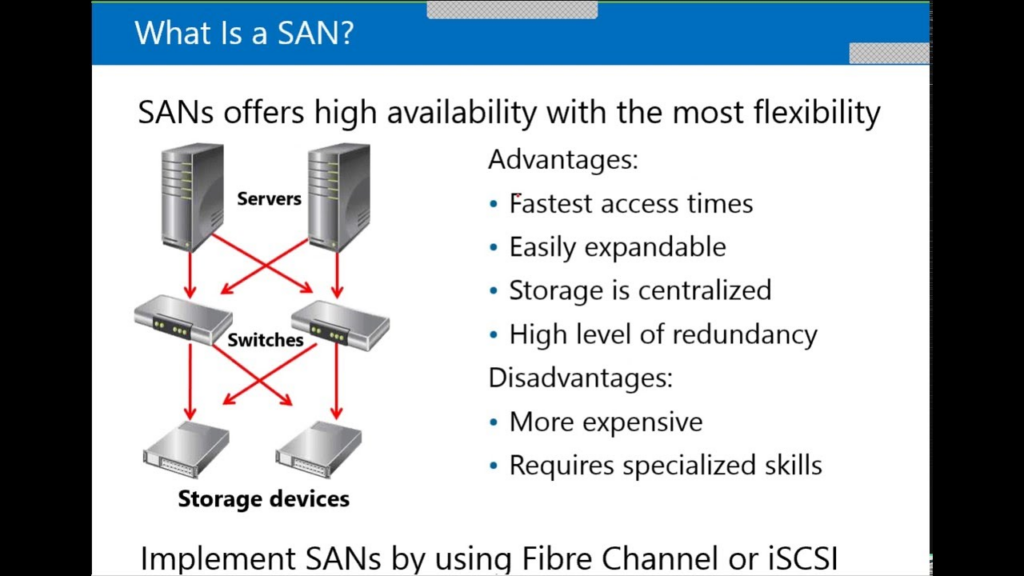
- Shared Storage – SAN/NAS accessible by multiple cluster nodes.
- Distributed Storage – Data spread across nodes (Ceph, GlusterFS).
- Storage Failover – Automatic switch to secondary storage.
Example Storage HA using SAN
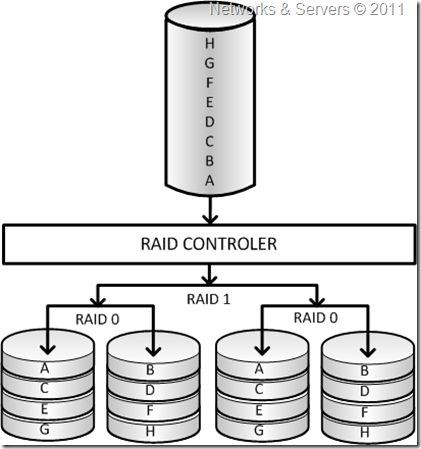
Example How Raid is used in HA Storage
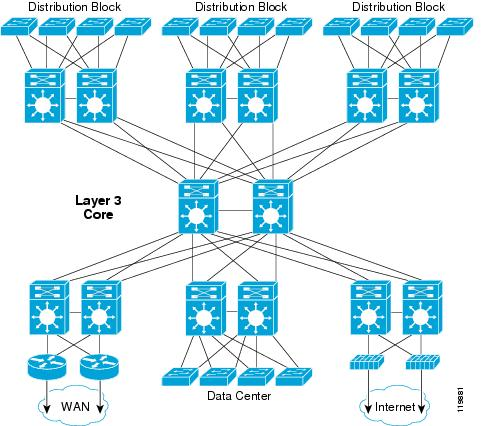
Example how Network Example in Enterprise base works:

Core Principles of HA Storage
- Redundancy – Multiple paths, controllers, disks.
- Failover – Automatic switch to healthy components.
- Consistency – Data integrity during failures.
- Exclusive Access – Prevent concurrent writes.
- Predictable Latency – Stable performance during failover.
1. High Availability Storage Models
1.1 Shared Storage (Single Logical Instance)
- One storage system
- Multiple access paths
- Internal redundancy
- External consumers (clusters)
Used by:
- NFS
- iSCSI
- SAN/NAS appliances
1.2 Replicated Storage (Distributed)
- Data replicated across nodes
- No single storage device
- Built-in consistency control
Used by:
- Ceph
- GlusterFS
- vSAN
This section focuses on NFS and iSCSI, which are most common in traditional HA clusters.
1.4. High Availability with NFS
1.4.1 NFS Overview
NFS (Network File System) provides file-level shared storage accessible by multiple clients over IP networks.
Commonly used for:
- VM disks
- Application shared data
- Backup repositories
1.4.2 HA Characteristics of NFS
- Multiple clients can mount the same export.
- No built-in fencing or locking for cluster safety.
- Relies heavily on external cluster control.
1.4.3 NFS HA Architectures
- Active/Passive NAS controllers
- Active/Active NAS clusters
- Virtual IP-based NAS access
1.4.4 Key Risks with NFS
- Concurrent writes from multiple nodes
- Stale file handles during failover
- Split-brain on storage side
- Network dependency (latency, packet loss)
1.4.5 What to Pay Attention To (NFS)
Storage Side
- Controller redundancy
- HA configuration on the NAS
- Export ownership during failover
- Snapshot and replication support
Network
- Dedicated storage network
- Redundant NICs and switches
- Jumbo frames consistency
- Predictable latency
Client / Cluster Side
- Ensure only one active writer
- Use cluster-managed mounts
- Proper mount options (
hard,timeo,retrans) - Disable manual mounts outside cluster manager
Operational
- Test NAS failover scenarios
- Monitor NFS latency and timeouts
- Document recovery procedures
1.5. High Availability with iSCSI
1.5.1 iSCSI Overview
iSCSI provides block-level storage over IP networks. The filesystem is managed by the client, not the storage.
Commonly used for:
- Databases
- VM disks
- Cluster filesystems
1.5.2 HA Characteristics of iSCSI
- Block-level access allows stronger control.
- Requires strict access coordination.
- Safer for HA clusters than NFS if properly configured.
1.5.3 iSCSI HA Architectures
- Dual-controller SAN
- Multipath I/O (MPIO)
- Active/Active or Active/Passive targets
1.5.4 Key Risks with iSCSI
- Multiple initiators writing simultaneously
- Path failures without MPIO
- Controller failover delays
- Filesystem corruption without fencing
1.5.5 What to Pay Attention To (iSCSI)
Storage Side
- Dual controllers
- ALUA support
- Consistent LUN ownership
- Write cache protection (battery/flash)
Network
- Dedicated iSCSI VLAN
- No packet loss
- Flow control / QoS awareness
- Redundant paths
Client / Cluster Side
- Multipath configuration (active/optimized paths)
- One writer unless cluster filesystem is used
- Proper SCSI reservations
- Coordinated LUN activation
Operational
- Validate path failover behavior
- Monitor I/O latency during failover
- Test controller failure scenarios
1.6. NFS vs iSCSI – HA Perspective
| Area | NFS | iSCSI |
|---|---|---|
| Access Level | File | Block |
| Split-Brain Risk | High | Medium |
| Cluster Safety | External | Stronger |
| Performance | Network-dependent | More predictable |
| Failover Control | Storage-side | Storage + client |
| HA Complexity | Lower | Higher |
| Typical Use | VM storage, shared data | Databases, HA clusters |
1.7. Common HA Storage Pitfalls
- Single NAS/SAN without controller redundancy
- Shared storage without fencing
- Using NFS without cluster-controlled mounts
- Missing multipath in iSCSI
- Ignoring storage latency in HA design
- No failover testing
1.8. Best Practices
- Treat storage as a cluster resource
- Never allow uncontrolled concurrent access
- Use fencing before storage failover
- Separate storage and heartbeat networks
- Test failure scenarios regularly
- Monitor latency, not only availability
Summary
High Availability Storage is not just about “storage being up”.
It is about controlled access, predictable failover, and data integrity.
NFS requires strict cluster discipline, while iSCSI provides stronger primitives, but demands careful configuration.
High Availability Network
- HA Network – Redundant network paths and devices.
- Redundant Switches/Routers – Avoid single network failure.
- Link Aggregation (LACP) – Combine multiple links for redundancy.
- VRRP / HSRP – Virtual IP failover between network devices.
- Load Balancers – Distribute traffic and detect unhealthy endpoints.
- BGP for HA – Route traffic dynamically based on availability.
High Availability Application
- HA Application – Application designed to run on multiple instances.
- Stateless Design – State stored externally to allow scaling.
- Horizontal Scaling – Add/remove instances dynamically.
- Health Probes – Liveness/readiness checks.
- Graceful Degradation – Partial functionality during failures.
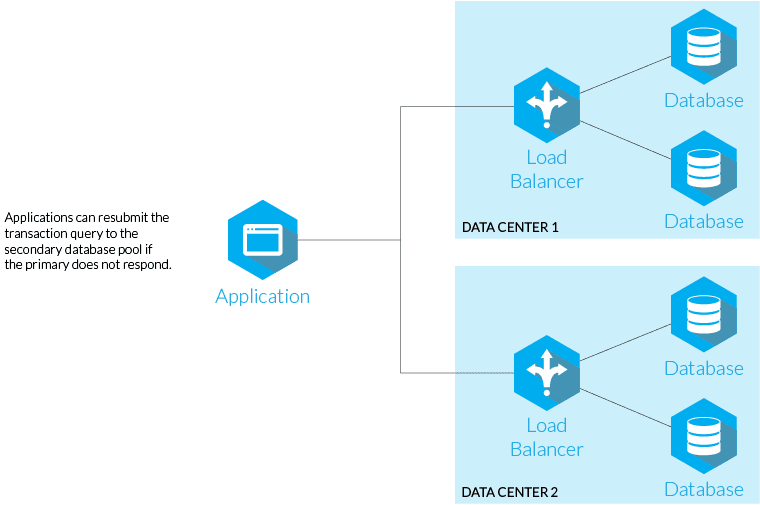
In some architectures, high availability logic is implemented directly at the application level. The application continuously monitors the health and status of underlying servers, storage endpoints, and connectivity (e.g. via custom health checks, heartbeats, or query-based validation such as SQL checks). Based on these signals, the application decides when to switch primary roles, redirect traffic, or change data access paths.
While this approach provides fine-grained control and fast reaction times, it is generally not recommended for infrastructure-level high availability. Embedding HA logic into the application tightly couples availability decisions with application code, increases complexity, and makes failure scenarios harder to predict and test. It also bypasses proven mechanisms such as quorum, fencing, and storage locking, increasing the risk of split-brain, data inconsistency, and undefined behavior during partial failures.
Best practice is to delegate high availability responsibility to the platform or infrastructure layer, allowing the application to remain stateless or failure-aware, but not failure-controlling. The application should react to failover events, not orchestrate them.
- Application-level HA should never replace platform-level HA.
- Platform-level HA should be the primary availability mechanism.
- Applications should be:
- Stateless where possible
- Failure-aware, not failure-controlling
- Designed to restart safely
Application-level HA can complement platform-level HA, but only in advanced, well-understood scenarios.
| Aspect | Application-Level HA | Platform-Level HA |
|---|---|---|
| Control Scope | Application only | Entire system stack |
| Failure Detection | Custom logic | Heartbeats, quorum |
| Split-Brain Protection | Weak or custom | Strong, built-in |
| Fencing | Rarely implemented | Native or enforced |
| Storage Safety | Application-dependent | Platform-enforced |
| Complexity | Very high | Medium |
| Operational Risk | High | Lower |
| Reusability | Low | High |
| Maintainability | Difficult | Easier |
High Availability Database
- HA Database – Database redundancy to avoid single-instance failure.
- Primary/Replica (Master/Slave) – Read replicas with failover.
- Multi-Primary (Multi-Master) – Writes on multiple nodes.
- Synchronous Replication – Zero data loss, higher latency.
- Asynchronous Replication – Better performance, possible data lag.
- Automatic Failover – Promote replica to primary on failure.
High Availability Kubernetes
- HA Kubernetes Control Plane – Multiple API servers, etcd nodes.
- HA etcd – Distributed key-value store with quorum.
- Node Pools – Multiple worker nodes across zones.
- Pod Replicas – Multiple pod instances per service.
- Self-Healing – Restart or reschedule failed pods.
- Rolling Updates – Zero-downtime deployments.
- Ingress Controllers – HA traffic entry point.
- Service Mesh – Resilient service-to-service communication.
Active/Passive vs Active/Active
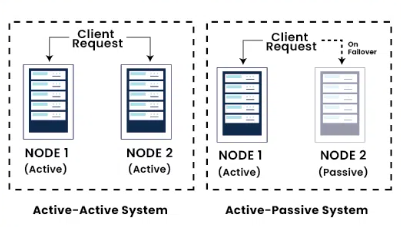
Active/Passive
- Active Node – Handles all traffic.
- Passive Node – Standby, waits for failure.
- Failover Time – Short downtime during switch.
- Complexity – Lower.
- Cost – Lower resource usage.
- Use Cases – Databases, legacy systems, stateful services.
Active/Active
- Active Nodes – All nodes handle traffic simultaneously.
- Load Balancing – Required to distribute traffic.
- Failover Time – Near-zero downtime.
- Complexity – Higher (data consistency, sync).
- Cost – Higher resource usage.
- Use Cases – Web apps, APIs, stateless services, Kubernetes.
Application on Kubernetes Example #1

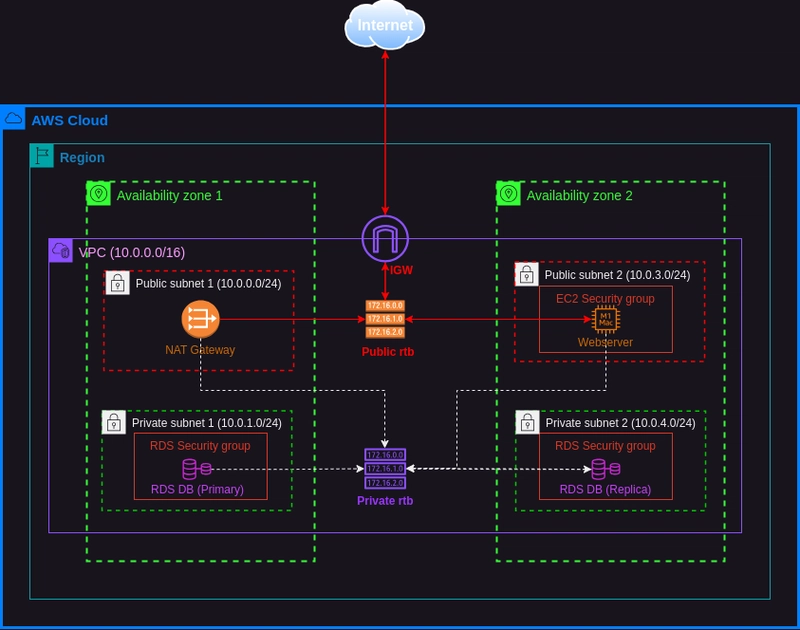
Application on Cloud (AWS) with multiple Region Example #2
Split-Brain – Definition
Split-brain is a cluster failure condition in which two or more nodes simultaneously assume they are the active/primary node due to loss of cluster communication, while still having access to shared resources.
The core problem is loss of coordination, not loss of availability.
2. Core Split-Brain Model (Applies to All Platforms)
Every HA cluster is built on three fundamental pillars:
- Cluster Communication
- Heartbeats between nodes
- Decision Authority
- Quorum or master election
- Resource Ownership
- Storage locks, virtual IPs, workload control
Split-brain occurs when communication is lost, but resource ownership is not enforced.
3. Split-Brain Control Mechanisms (Unified View)
3.1 Quorum
- Majority-based decision model
- Cluster remains operational only if quorum is met
- Prevents equal partition decisions (50/50)
Risk:
2-node clusters without a witness
3.2 Witness / Tie-Breaker
- Third independent vote
- Can be a small service or storage component
- Breaks deadlock situations
3.3 Fencing (STONITH)
- Physically or logically isolate a failed node
- Power off, reset, or revoke access
- Ensures only one active owner
3.4 Resource Locking
- Prevents simultaneous writes
- Storage-level enforcement
- Mandatory for stateful workloads
4. Split-Brain Handling in Proxmox (Unified View)
4.1 Decision Model
- Corosync-based quorum
- All cluster decisions require quorum
- Configuration stored in distributed cluster filesystem
4.2 Failure Scenario
- Cluster network partition occurs
- Nodes lose communication
- Nodes independently continue running
4.3 Protection Mechanisms
- Quorum enforcement blocks cluster actions without majority
- QDevice acts as external witness
- Storage awareness depends on backend type
- HA Manager respects quorum state
4.4 Operational Characteristics
- Without quorum:
- No VM start/stop
- No config changes
- VMs already running may continue
- Manual intervention can bypass safety mechanisms
4.5 Key Design Requirements (Proxmox)
- Minimum 3 votes (nodes or qdevice)
- Redundant Corosync networks
- Cluster-aware storage preferred (Ceph)
- Restricted manual VM control
5. Split-Brain Handling in VMware (Unified View)
5.1 Decision Model
- HA master-based architecture
- Centralized control via vCenter
- Storage-backed liveness verification
5.2 Failure Scenario
- Management network partition
- Hosts lose peer visibility
- Shared storage still reachable
5.3 Protection Mechanisms
- HA master election
- Datastore heartbeating
- VMFS exclusive locks
- Configurable isolation response
5.4 Operational Characteristics
- Isolated hosts follow predefined behavior
- VM power-on prevented without storage locks
- Failover decisions centralized
5.5 Key Design Requirements (VMware)
- Multiple management networks
- Multiple heartbeat datastores
- Correct isolation response policy
- Admission control enabled
6. Proxmox vs VMware – Consistent Comparison
| Area | Proxmox | VMware |
|---|---|---|
| Decision Authority | Quorum | HA Master |
| Tie-Breaker | QDevice | Datastore heartbeat |
| Resource Locking | Storage-dependent | VMFS enforced |
| Fencing Strength | Limited | Strong (implicit) |
| 2-node Cluster Safety | Requires qdevice | Supported |
| Manual Override Risk | High | Low |
7. What to Review in Any HA Design
Architecture
- Number of nodes
- Voting model
- Witness placement
Networking
- Heartbeat network isolation
- Redundant paths
- Latency tolerance
Storage
- Locking behavior
- Replication method
- Failure domains
Operations
- Isolation response policies
- Manual override permissions
- Failover testing procedures
8. Unified Best Practices
- Never rely on a 2-node cluster without a witness
- Enforce quorum-based decisions
- Use fencing wherever possible
- Separate heartbeat and data traffic
- Prefer storage with built-in locking
- Test partition scenarios regularly
9. Summary
Split-brain prevention is not platform-specific—it is a coordination, authority, and ownership problem.
Proxmox emphasizes quorum correctness, while VMware enforces resource ownership via storage locks. Both approaches are valid if designed and operated consistently.